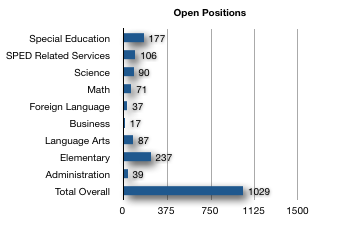
Special Education Related Services reflects positions in speech/language pathology, physical therapy, occupational therapy, school psychologist, and social workers.
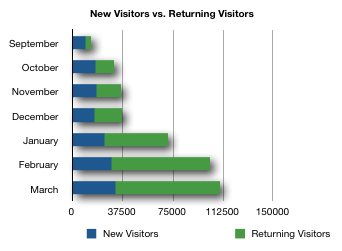
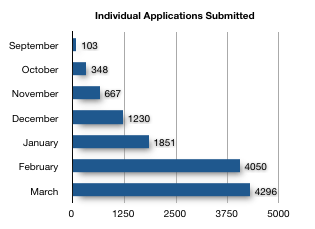
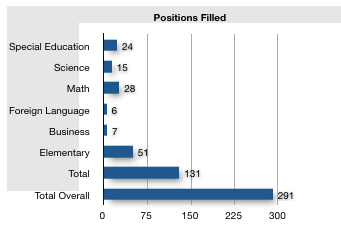
 We also are experiencing a continued increase in traffic with 79,000 visitors last month and currently projecting 90,000 visitors this month. We will continue to update this data as positions are filled and new jobs are added.
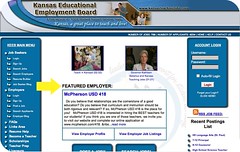
To ensure that your district is included in this new feature include information about your district and community in your employer description. If you would like to edit your employer description, login to www.kansasteachingjobs.com and click on Edit Profile.

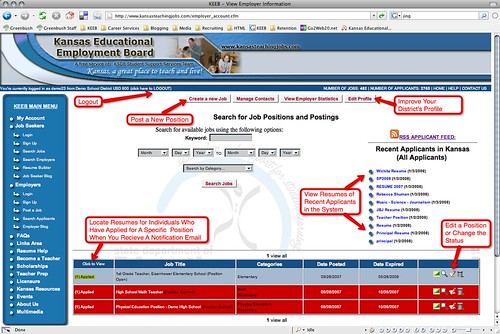
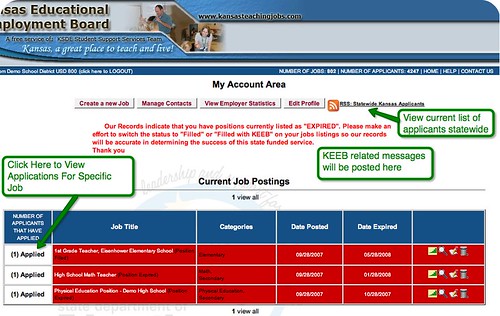
We continue to work on phase II features for the Kansas Education Employment Board. Many of these features are behind the scenes work to increase traffic to the website, such as the partnership with hirekansastalent.com. In conjunction with the behind the scenes work we continuing to work at making the website as user friendly as possible. In an effort to help new users we are adding screenshots with tips to the Help Page. Above is just an example of what users will be able to access as they become familiar with the tools and features of the website. This new resource is intended to ensure that districts are utilizing each feature to the best of their ability in their retention efforts.


 Beyond posting job announcements, the redesign Kansas Education Employment Board (KEEB) now allows registered employers to search for candidates. You can conduct a search by either key word and/or endorsement to locate individuals interested in teaching in Kansas. To use the search tool, login to www.kansasteachingjobs.com or Sign Up for an employer account under Employers in the KEEB Main Menu. Once you are logged in, click on "Search Applicants" in the KEEB Main Menu. You will then see a list of applicants including their contact information and their endorsement(s). To view their full application click on the magnifying glass. You can now view the applicants qualifications, download any attachments they may have included (i.e. cover letter), and print a copy for your file.


 The redesign KEEB now provides RSS Feeds of both job postings to job seekers and applicant resumes to employers. RSS Feeds can be received either at your computer via an rss reader such as Google, Yahoo, or Net Vibes, or on your mobile device such as a cell phone or ipod. You can preview what a KEEB RSS feed would look like on a cell phone on the image to the right.
 As we prepare to launch the new Kansas Education Employment Board (KEEB) we will be providing districts, schools, and agencies in Kansas, that utilize KEEB to hire employees, with information on the redesign. Above is a comparison of the old KEEB vs. the new KEEB for employers.